A test that is not written down is easy to launch and hard to learn from. That is why a simple AB testing template belongs in the weekly routine of any store that runs experiments. It does not need to be a complicated system. It needs a backlog, a clear plan for the next test, a pre-launch check and a place to record what you learned.
customfit.ai already publishes an A/B testing roadmap template for longer planning cycles. This post is the companion you use every week: an ab testing plan template you can copy into a spreadsheet, plus an experiment log template and an ab test checklist you can run before every launch.
The goal is not prettier documentation. The goal is fewer rushed tests, fewer forgotten results and a backlog that actually gets smaller.
What an AB Testing Template Should Include
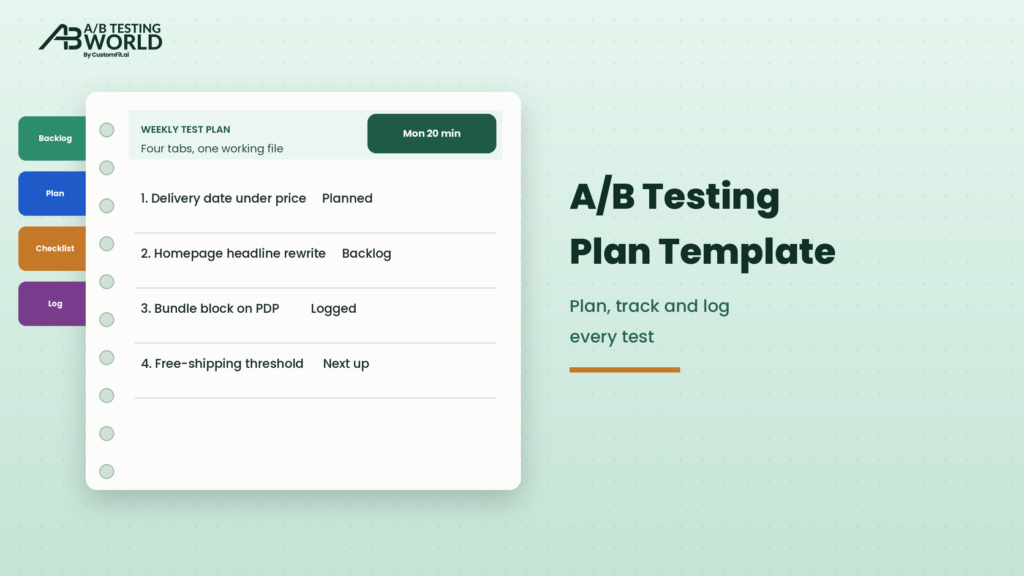
A useful ab testing template has four working parts. Keep them on separate tabs if you use a spreadsheet, or as four tables if you keep it in a doc.
- 1. A backlog of test ideas, each with a hypothesis, a page and a metric.
- 2. A plan for the test you are about to run: audience, split, duration, sample size and decision rule.
- 3. A pre-launch ab test checklist, so tracking and assignment are confirmed before traffic is spent.
- 4. An experiment log, so wins, losses and inconclusive tests all leave a written lesson.
If you already write hypotheses with our A/B test hypothesis template, paste each one into the backlog. The plan template then turns that hypothesis into a test you can actually run.
A/B Testing Plan Template: The Four Tables
You can rebuild these tables in Google Sheets or Excel in about 15 minutes. That is the whole “ab testing excel template”: four tabs, no macros, no hidden formulas you cannot audit.
Tab 1. Backlog
| Field | What to write |
| Idea name | A short label, such as “PDP delivery date” |
| Page or template | Product page, collection, cart, checkout, home |
| Hypothesis | If we do X, then metric Y will change, because Z |
| Primary metric | One metric that decides the test, usually conversion rate or revenue per visitor |
| Guardrails | Two or three metrics that must not get worse, such as add to cart or refund rate |
| Priority score | A 1 to 10 score (see below) |
| Status | Idea, planned, running, logged |
| Owner | One name |
A backlog with 15 to 30 ideas is healthy. A backlog with 80 unranked ideas is a parking lot. Review it once a week, add new ideas from support tickets and session recordings, and drop ideas you would not run in the next quarter.
Tab 2. Priority score
You do not need a perfect scoring model to start. For this plan, use a simple 1 to 10 that you can explain in one sentence.
| Input | Score 1 | Score 5 | Score 10 |
| Expected impact on the primary metric | Tiny copy tweak | Clear offer or layout change | A change to a high-traffic, high-intent step |
| Ease of shipping | Needs engineering and QA | Theme change, a few days | Can launch inside the testing tool today |
| Evidence | A hunch | Pattern from heatmaps or support tickets | Prior test, research or strong on-site data |
| Traffic | A low-traffic page | A mid-traffic template | Home, product or cart with steady volume |
Add the four scores and sort the backlog from high to low. When two ideas are close, pick the one you can launch this week. If you later want a more formal yes/no model, PXL is a good next step, but a plain score already beats an unsorted list.
Tab 3. The test plan (one row per running test)
This is the heart of the ab testing plan template. Fill it in before you open the testing tool.
| Field | Example |
| Test ID | 2026-11-PDP-01 |
| Hypothesis | If we show a delivery date under the price, then add-to-cart rate will rise, because shoppers can tell when the item will arrive |
| Page | Product page template |
| Audience | All visitors, excluding internal traffic |
| Split | 50/50, persisted on returning visits |
| Primary metric | Add-to-cart rate |
| Guardrails | Conversion rate, revenue per visitor |
| Baseline and MDE | 8.0% add-to-cart, 10% relative lift |
| Sample size and duration | 8,200 visitors per group, 14 days (covers two weekends) |
| Decision rule | Ship if the lift is significant at 95% and no guardrail is worse |
| Start and end dates | 1 Dec to 14 Dec, no early stop |
| Owner and reviewer | Priya (owner), Sam (reviews tracking) |
The sample size line should come from a real calculation, not a guess. Use our A/B test sample size formula and, if you have a minimum lift in mind, our guide to minimum detectable effect. Write both numbers down so nobody shortens the test because “it already looks good.”
A Pre-Launch A/B Test Checklist
Run this ab test checklist on the morning of launch, not after the first thousand visitors.
- The hypothesis, primary metric and decision rule are filled in on the plan tab.
- The variant matches the hypothesis: one meaningful change, not a bundle of unrelated edits.
- Assignment is sticky. Returning visitors stay in the same group.
- The snippet or flag fires on the planned template only, including mobile.
- Add-to-cart, checkout and purchase events fire once in both groups, checked in a staging preview or an A/A style dry run.
- QA covers a guest and a logged-in user, a mobile device and a desktop browser, and a discount-code path if you use one.
- The planned end date is on the calendar, and the team agrees not to peek and stop early.
If any item fails, do not start the test. A half-checked launch is how tracking bugs eat two weeks of traffic. For a fuller setup walkthrough, see how to set up a winning A/B test.
Read more: What Makes a Good A/B Test? Avoiding Common Mistakes
Turn Your Plan Into a Live Test
Launch the next experiment on your store with stable assignment, clear goals and readable results, without writing code. Try CustomFit.ai free for 14 days.
Experiment Log Template
The experiment log template is filled in on the day you stop the test, while the details are still fresh. Wins, losses and flat results all get a row. A test that is not logged will be rerun a year later by someone who does not remember it.
| Field | What to write |
| Test ID and name | Match the plan tab |
| Dates and sample | Actual start, end and visitors per group |
| Split check | Pass or fail, with the counts |
| Primary result | Control rate, variant rate, lift, confidence interval, p-value |
| Guardrails | Each one: up, down or flat |
| Decision | Ship, iterate, drop, or rerun |
| Why | One short paragraph, not a screenshot dump |
| Follow-up | The next idea this result created, or “none” |
| Link | Dashboard, doc or ticket |
Here is a filled row for the delivery-date test above. After 14 days the store had 8,410 visitors in control and 8,355 in the variant (a healthy split). Add-to-cart was 8.05% vs 8.92%, a 10.8% relative lift, with a 95% confidence interval of +3% to +19% and a p-value of 0.04. Conversion rate and revenue per visitor were slightly up, not down. Decision: ship the delivery date on the product page template, then test a more precise date range on paid-traffic landing pages.
That one paragraph is more useful six months later than a folder of dashboard exports. It also stops a “failed” test from feeling like wasted work. A flat result that tells you a badge does not move add-to-cart is a finding, and it belongs in the log.
How to Use This as an A/B Testing Excel Template
If you prefer Excel or Google Sheets, create a workbook with four tabs named Backlog, Score, Plan and Log. Freeze the header row on each tab. Use data validation for Status (Idea, Planned, Running, Logged) and for Decision (Ship, Iterate, Drop, Rerun). You do not need a purchased “ab testing excel template.” A workbook you understand will get used.
A simple weekly rhythm keeps the file alive:
- 1. Monday, 20 minutes: backlog and score. Transfer ideas that came out of last week’s support tickets, session recordings, or the test you just logged. Archive any idea that has had no owner or no score for two weekly cycles. Then sort the Score tab and confirm that this week’s launch is the highest-ranked idea someone can actually build, not just the top number on the sheet.
- 2. Before launch: plan and checklist. Fill the plan row and walk the ab test checklist with a second person.
- 3. During the test: do not edit the decision rule. You may watch traffic and the split check. You may not stop early because a metric turned green.
- 4. On the end date: log the result the same day. Then pick the next idea from the backlog.
Teams that skip the log slowly lose their history. Teams that skip the checklist slowly lose trust in the numbers. The template only works if both tabs stay in use.
Documentation habits at larger experimentation programs follow the same idea: write the decision rule first, then the result, as Kohavi, Tang and Xu argue in Trustworthy Online Controlled Experiments. For a broader planning view that sits above this weekly file, use the roadmap template on customfit.ai.
Where to Start This Week
If you have no file today, do not design a perfect system. Open a spreadsheet, paste the four tables, and add the last three tests you remember to the log, even if the numbers are incomplete. Then write five backlog ideas and score them. Plan one test for the next two weeks. That is enough to start.
If you already have a messy doc, map it onto these four tabs and archive the rest. The template should be short enough that people actually fill it in.
Pick One Idea and Start Testing
Begin with the highest scored idea in your backlog. Try CustomFit.ai free for 14 days, no credit card required.
Summary
An ab testing template is a weekly working file, not a slide theme. Keep a backlog of scored ideas, a one-row plan for the test that is about to run, a pre-launch ab test checklist, and an experiment log template that records every result. You can build this as an ab testing excel template or a Google Sheet in a single sitting. Fill the plan before launch, refuse to change the decision rule mid-test, and log the outcome on the end date. Used this way, the ab testing plan template turns a pile of ideas into a sequence of tests you can defend and learn from.
FAQs
What should an A/B testing template include?
It should include a backlog of ideas with hypotheses and metrics, a plan for the next test (audience, split, sample size and decision rule), a pre-launch checklist, and an experiment log for every finished test. Four tabs in a spreadsheet are enough. Extra dashboards are optional.
How do I create an A/B testing plan template?
Copy the four tables in this post into Google Sheets or Excel. Put each idea in the backlog, score it, then fill one plan row before you launch. Agree the decision rule in writing and set the end date on a calendar so the test is not stopped early.
Can I use this as an A/B testing Excel template?
Yes. Rebuild the backlog, score, plan and log tables as four worksheets. Freeze the headers and add drop-down lists for status and decision. You do not need macros or a paid file. A simple workbook that the team actually updates is better than a complex one that sits unused.
What belongs in an experiment log template?
Each row should record the test ID, dates, sample size, split check, primary result (rates, lift, confidence interval, p-value), guardrails, the decision, a short explanation, and the follow-up idea. Log wins, losses and inconclusive tests on the day the test ends.
What is on a good A/B test checklist before launch?
Confirm the hypothesis and decision rule are written down, the variant matches that hypothesis, assignment is sticky, events fire once in both groups, and QA covers mobile, desktop, guest and logged-in users. If any item fails, delay the launch.
How often should I review the test plan?
Review the backlog and scores every week, usually in a 20-minute Monday meeting. Fill the plan and checklist just before launch. Write the log entry on the end date. Do not reopen the decision rule while the test is running.