
GA4 is very good at telling you what happened on a page, and much less good at telling you whether a change caused it. That is the first thing to get straight about AB testing GA4. If you already use our step-by-step guide to setting up an A/B test, this post covers the analytics side: sending variant IDs into GA4, building an exploration, and checking significance somewhere else.
It also covers a simple method for a/b testing in google analytics 4 with Google Tag Manager, and the limits that make it a poor substitute for a real testing tool.
The aim is a clean ga4 experiment tracking setup you can trust. Google Optimize shut down in 2023, and GA4 never replaced it with a stats engine.
AB Testing GA4: What It Can and Cannot Do
GA4 can record which version a visitor saw and how those visitors behaved, including conversion rate, revenue and add-to-cart rate. That is valuable, because your testing tool and your analytics should agree.
GA4 cannot, on its own, tell you whether a difference is statistically meaningful. Standard explorations have no p-value, no confidence interval and no sample ratio mismatch check. The “percentage change” in a report is just arithmetic. If you stop a test because GA4 showed a 12% lift after two days, you are peeking.
So the right job for ab testing ga4 is measurement and diagnosis. The right job for a calculator, a spreadsheet or your testing tool is the decision.
Send Variant IDs into GA4 Experiment Tracking
The cleanest setup is to send two values with the events you already care about: an experiment ID (such as “pdp-delivery-date-2026-11”) and a variant ID (such as “control” or “variant_b”). Register those as an ab test custom dimension ga4 teams can use in explorations.
1. Decide the scope
A user-scoped custom dimension is usually better for assignment, because a returning visitor should stay in the same group. An event-scoped dimension is useful when you also want the version on a single hit, such as a purchase. Many stores send both, so a purchase row is self-contained.
If a visitor can be reassigned on a later session, the groups will mix and the test will be hard to read. Persist the assignment in a first-party cookie or in your testing tool, then read that value in the tag.
2. Create the custom dimensions
In GA4, go to Admin, then Custom definitions, and create:
- `experiment_id` (user or event scope)
- `ab_variant` (user or event scope)
The parameter name in the tag must match the dimension’s event parameter or user property exactly. Google’s help article on custom dimensions and metrics in GA4 is the reference for scope, naming and the delay before values appear in reports.
3. Fire the values from your testing tool or from GTM
If you already have a testing tool, push the experiment ID and variant into the data layer when assignment is known, then send those values to GA4 through Google Tag Manager. If you are still wiring events, the customfit.ai guide to tracking setup for A/B testing events is a useful checklist.
Do not send the variant only on a “test assigned” event and then forget it on the purchase. Analysts will under-count orders in one group if the purchase event lacks the parameter.
4. QA before you launch
Open GA4 DebugView, load the control and the variant in separate cookies, and confirm:
- The user property or event parameter is present and spelled correctly.
- A purchase or add-to-cart in each group carries the same variant value.
- A page refresh does not flip the visitor into the other group.
Wait until the custom dimensions have populated in an exploration, which can take a day after you create them, before you treat the report as official.
Build an Exploration Report in GA4
Once the dimensions are live, a free-form exploration is the most reliable place to read a/b testing in google analytics 4.
- 1. Create a free-form exploration and set the date range to the exact test window, after assignment started and before any rollout.
- 2. Add a filter or inner query for the experiment ID, so leftover tests do not pollute the rows.
- 3. Put `ab_variant` in rows.
- 4. Add metrics that match your plan: active users or sessions (the same unit you assigned), the primary conversion, conversion rate, and revenue if that is a guardrail or the primary metric.
- 5. If you assigned at the user level, use active users as the denominator, not sessions. A session-based rate will not match a user-based test.
- 6. Export the table. Do not make the ship-or-kill decision in the exploration UI.
A simple, honest table looks like this.
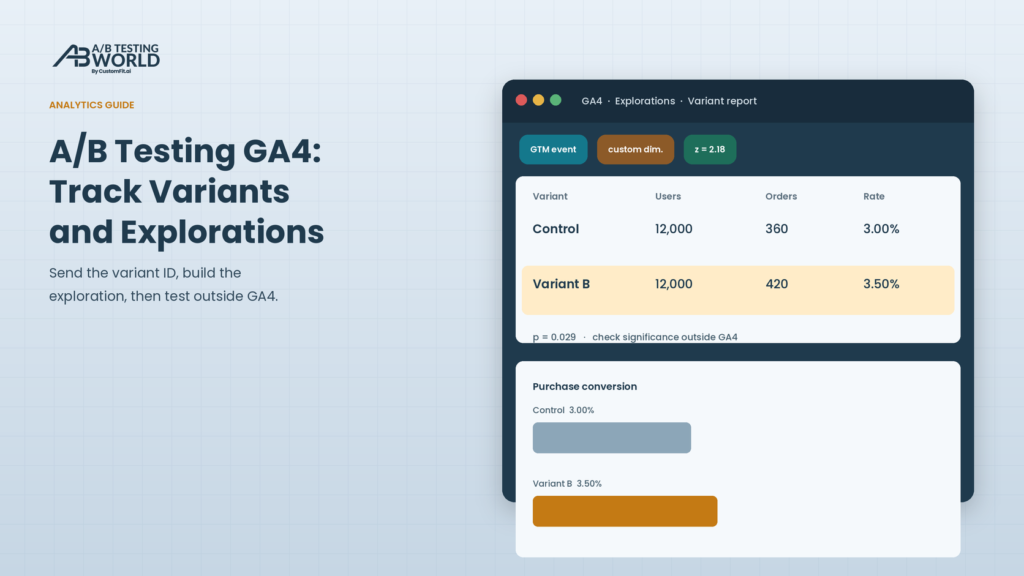
| Variant | Active users | Purchases | Conversion rate | Revenue |
| control | 12,000 | 360 | 3.00% | $43,200 |
| variant_b | 12,000 | 420 | 3.50% | $48,300 |
GA4 will happily show that variant_b is “up” 16.7% in conversion rate. That is the starting point for analysis, not the end of it.
Read more: How to Choose the Right Metrics for A/B Testing Success
Measure the Test on Your Store
Run experiments with stable assignment and clear variant reporting, then read the results against a planned sample size. Try CustomFit.ai free for 14 days.
Check Significance Outside GA4
Take the table above and finish the analysis in a calculator or a spreadsheet. For two conversion rates, a two-proportion z test is the usual choice. Here, 360 of 12,000 versus 420 of 12,000 gives z = 2.18 and a p-value of 0.029. At a pre-set 0.05 significance level, that is below the cutoff. A 95% confidence interval on the relative lift runs from about +2% to +32%, so you should still check guardrails and whether the lift is large enough to be worth the change.
None of those numbers come from GA4. That is expected. Use our guide to the p-value in A/B testing to read the significance test, and size the next experiment with the A/B test sample size formula.
Also check the split. If the exploration shows 12,800 users in control and 11,200 in the variant against a planned 50/50, stop and investigate before you interpret the lift.
A few more rules keep the export honest:
- Use the same date range and the same filters you wrote in the test plan.
- Exclude internal traffic, and be careful with consent-mode modeled data if one group had a different tag load.
- If revenue is the primary metric, do not rely on a conversion-rate z test. Revenue is skewed, and you need a method suited to means, not proportions.
- Pre-planned segments (device, new versus returning) can be added as a breakdown. Unplanned slices are exploratory only.
A/B Testing Google Tag Manager: A Simple Split and Its Limits
You can run a very small test with ab testing google tag manager alone: assign a cookie, swap a page element, and send the variant to GA4. This is useful for a copy or layout change on a low-risk page, and a poor choice for checkout, pricing or any decision you need to trust.
A typical GTM pattern looks like this:
- 1. On the first hit, a custom HTML or JavaScript tag checks for a cookie such as `ab_pdp_layout`. If it is missing, the tag draws a random 50/50 value, writes a first-party cookie and stores the value in the data layer.
- 2. A second tag, or the same one, changes the page: a headline, a block of copy or a CSS class.
- 3. Your existing GA4 configuration or event tags read `ab_variant` from the data layer and send it as a user property and as an event parameter.
- 4. You QA both buckets in DebugView, as above, then read the exploration after the planned date.
The limits matter more than the steps.
- You are responsible for a stable split. GTM will not warn you about sample ratio mismatch, bot traffic or a cookie that fails in some browsers.
- Flicker is common. If the variant tag runs after the page has painted, visitors may see the control first. That can change behavior and bias the test, especially on mobile.
- Consent and ad blockers will drop data unevenly. If the GA4 tag is blocked more often in one group, your counts will not match the assignment.
- There is no significance engine and no guardrail alert. You must export and analyze, and you must decide the sample size in advance.
- Complex changes are fragile. A checkout, a redirect, or a change that depends on product data is better done in a dedicated testing tool or on the server.
Treat a GTM-only split as a way to practice ga4 experiment tracking, or to answer a small question on a content page. For a revenue change, use a tool that handles assignment, QA and the stats, and still send the variant into GA4.
For a wider comparison of analytics tools, see customfit.ai’s walkthrough of GA4 vs Mixpanel for ecommerce, which helps when you are deciding where the variant dimension should live.
A Short Checklist Before You Trust the Report
| Check | Passes if |
| Assignment is sticky | A refresh and a return visit keep the same variant |
| Dimensions are populated | `experiment_id` and `ab_variant` appear in DebugView and in an exploration |
| Events carry the variant | Purchase and add-to-cart events include the same values |
| Denominator matches the design | User-level tests use users, not sessions |
| Split is balanced | Observed counts are close to the planned ratio |
| Significance is calculated outside GA4 | You have a p-value or confidence interval from a planned test, not from a GA4 percentage change |
| Date range is clean | The exploration starts after launch and ends before any rollout |
If any row fails, fix the tracking and, if the test has already been running, consider restarting it. A broken dimension cannot be repaired by adjusting the lift.
Pick One Idea and Start Testing
Launch a clean experiment on your store, with variant data you can also read in analytics. Try CustomFit.ai free for 14 days, no credit card required.
Summary
Ab testing ga4 works well as a measurement layer and poorly as a decision engine. Send a sticky experiment ID and variant into GA4 as a custom dimension, build a free-form exploration for the test window, and export the counts. Then calculate significance, a confidence interval and a split check outside GA4. You can run a simple split with ab testing google tag manager, but flicker, no SRM alert, uneven consent and no stats engine make it a weak choice for revenue tests. Use GA4 to see the same story your testing tool tells, not to replace that tool.
FAQs
Can I run A/B testing in GA4 without another tool?
You can record variants in GA4 and even assign traffic with Google Tag Manager, but GA4 will not calculate statistical significance or warn you about a bad split. For a revenue test, use a dedicated testing tool for assignment and stats, and still send the variant into GA4 for reporting.
How do I set up an ab test custom dimension in GA4?
Create custom dimensions for the experiment ID and the variant, matching the event parameter or user property names you will send. A user-scoped dimension is usually best for assignment. Then fire those values from your testing tool or from GTM, and confirm them in DebugView before you launch.
What is the best way to do GA4 experiment tracking?
Persist the assignment, send the experiment ID and variant on key events as well as a user property, filter explorations by experiment ID, and use the same denominator you used in the test plan. Export the table and run the significance test outside GA4.
How does A/B testing Google Tag Manager work in practice?
A GTM tag can set a first-party cookie, change a page element and push the variant into the data layer for GA4. It works for small, low-risk changes. It does not give you sample ratio mismatch checks, flicker control or a significance engine, so it is a weak setup for checkout or pricing tests.
Why shouldn’t I use GA4’s percentage change to call a winner?
The percentage change is only the difference between two observed rates. It does not account for sample size, variance or repeated peeking. A 16% lift on a small sample can be noise. Calculate a p-value or a confidence interval, and only after the planned sample or duration is reached.
Should I use users or sessions in the GA4 exploration?
Use the same unit you assigned. If a visitor is bucketed once and kept there, count users. A session-based conversion rate will not match a user-level test and can make a balanced experiment look uneven.